Configuring Assignment From Parent
A child meter can be assigned a gas load forecast value from its parent group instead of directly forecasting its own value. In some situations it might be more useful to perform forecasting at a group level and then assign forecast values down to child meters. In order for a child meter or meter group to be allocated a value from its parent meter group, the child meter or meter group must have its Value Assignment Type type set to Assignment from Parent. See Value Assignment Type for more information.
To assign a forecast value to a child meter from a parent meter group, assignment can be set using one of two assignment methods:
- Assign Fixed Quantity, which allocates a percentage of the net forecast, or a fixed amount and a percentage of the net forecast for each child meter or group.
- Balance from Historical Profile, which defines a historical profile offset that assigns a balanced proportion of the net forecast to selected multiple child meters to determine the relation between the flows of multiple child meters.
The Assignment Rules for Children of <Meter Group> dialog box shows a list of defined assignment rules. Properties displayed include: Child members in the Parent group, the Assignment Rule for each child, the Value Assignment Type for each child, and the settings for each selected child: Fixed Quantity or Balance from Historical Profile. The dialog box shows all children of the current parent.
To Configure Assignment From Parent
- Click the Meters/Owners page of the ELF Editor.
- Add a New Child or New Sibling, or double-click to Edit a configured meter.
- Configure the properties in the General page.
- Click the Assignments page.
- Click Assignment from Parent from the Value Assignment Type drop-down menu.
- Click Assignment to view the Assignment Rules dialog box.
- Configure the rule using the properties described below.
Assign Fixed Quantity
|
Assignment Rules |
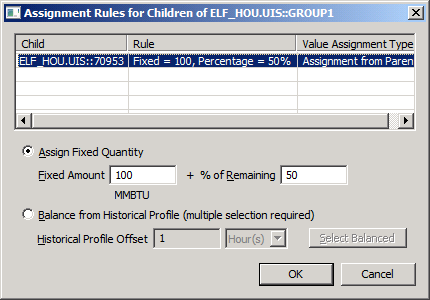
A group’s assignment settings may include a fixed amount and percentage of the net forecast for each child meter or meter group or a percentage of the net forecast. The assignment is fixed for the time period of the forecast.
Fixed Amount and Percentage of Net Forecast
Qualified child members will be assigned a gross forecast value based on a fixed amount, unique to each child member, plus a percentage, also unique to each child member, of the parent meter group’s net forecast value after subtracting all fixed amounts specified.
To assign a gross forecast value based on a fixed amount, plus a percentage of the parent meter group’s net forecast value after subtracting all fixed amounts specified, configure the Assignment Rule for each child member this way:
| Parameter | Description |
|---|---|
|
Fixed Amount |
Type a fixed assignment amount (in units), unique to each child member. |
|
Percentage of Remaining |
Type a percentage value, unique to each child member. |
Percentage of Net Forecast
Qualified child members will be assigned a gross forecast value based on a percentage, unique to each child member, of the parent meter group’s net forecast value. To assign a gross forecast based on a percentage of the parent meter group’s net forecast value, configure the Assignment Rule for each child member this way:
| Parameter | Description |
|---|---|
|
Fixed Amount |
Leave the fixed amount at 0. |
|
Percentage of Remaining |
Type a percentage value, unique to each child member. |
Example
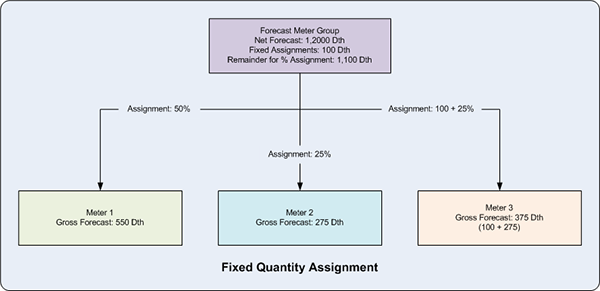
In the following example, the amounts to be allocated from Forecast Meter Group must be calculated by: 1) subtracting the fixed assignments from the group’s net forecast; then 2) using the remainder to determine the amounts based on the assignment percentages.
|
Assignment example |
Balance from Historical Profile
|
Balance from Historical Profile |
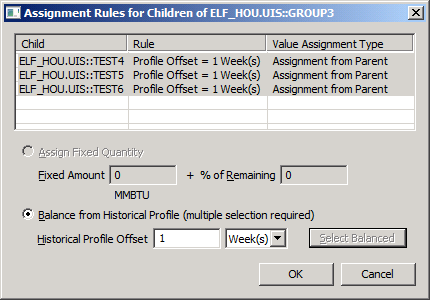
To allocate a gross forecast value to child meters from a parent meter group using a profile from a previous historical period, select the Balance from Historical Profile option. This option takes the actual gas load values for each child meter in the past and assigns a balanced proportion of the net forecast to the child meters matching the proportion from the past. Two or more child meters must be selected in order to balance the load across the children matching the historical profile.
| Parameter | Description |
|---|---|
|
Historical Profile Offset |
Specify a time offset, into the past, from which to read actual historical gas load values. |
|
Units |
Select the units for the time offset from the drop-down menu. Options include Hours, Days, or Weeks. |
|
Select Balanced |
Click to select all child meters with the balance assignment, or use Ctrl+Click to select non-contiguous child meters and Shift+Click to select contiguous child meters. |
Example
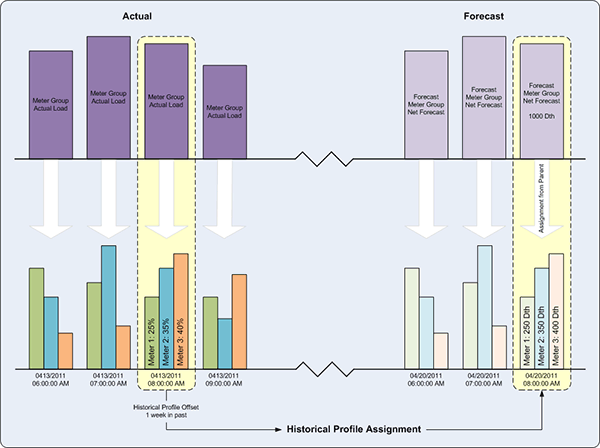
In the following example, the net forecast for the Forecast Meter Group is assigned to its child meters based on the proportion of the actual child meter values in the meter group for the corresponding hour one week in the past. For Meter 1 the historical value was 25% of the total, so Meter 1 would receive 25% of the gross forecast for the forecast hour; for Meter 2 the historical value was 35% of the total, so Meter 2 would receive 35% of the gross forecast for the forecast hour; and for Meter 3 the historical value was 40% of the total, so Meter 3 would receive 40% of the gross forecast for the forecast hour.
|
Parent/child Assignment example |